
An Easy Way to Make Author Links Page Without Linktree (Carrd + Alternatives)
Indie authors have a lot of online presence to manage. Amazon pages, Goodreads profile, social media accounts, and a dozen other stores and links. Keeping track of everything is quite a hassle. Tools like Linktree give you one simple page for readers to find everything about your books.
Linktree has been the default for building author links page for years. Honestly, it works fine mostly. However, if you need control of your page, the Internet has better Linktree alternatives for authors.
Let’s see how to create better author links pages without Linktree.
Why Linktree Isn't the Best for Indie Authors
Linktree isn't bad (or evil). It's quick, it's easy, and millions of authors use it. However, when you’re an indie author, you need a memorable online presence. You need to stand out in a very crowded and chaotic book market. And do it fast. Linktree isn’t really the way to go about that.
The biggest limitation of Linktree is its lack of author branding. Your page often looks like a million others. Unless you're paying for premium tiers, you're stuck with limited, basic templates and design choices. The analytics on free plans aren’t phenomenal either.
For indie authors focused on community building and discoverability, these shortcomings can make a world of difference. You need an author bio links page that reflects your voice, supports your marketing goals, and puts you in control. That’s why Carrd. Of the many things Carrd does well, a sleek link-in-bio page is among the easiest ones.
Carrd: The Best Linktree Alternative for Authors
I'm a little obsessed with Carrd.co, so I may be biased. However, I truly believe Carrd is the best Linktree alternative for creating an author links page. It's a one-page website builder that lets you create a clean, professional link-in-bio in minutes. And the best thing is that Carrd for authors is pretty much no-code. You don't need to know a single line of code (unless you want fine-tweaking).
Unlike Linktree, Carrd gives you full control. Want your page to match your book cover colours? Done. Want to add a custom font that feels you? Easy. Need a custom domain instead of a generic URL? Carrd's link-in-bio for authors has got you.
I've been using Carrd for several Book Blabber pages. I’ve Carrd pages for customised author PR kits, an ARC tracker template, and a book recommendations page. Then, I also have a bunch of newsletter sign-up pages and author pages built with Carrd.
And now, I also have a link-in-bio page built with it. Setup took me about 30 minutes (I already had my page content sorted). The customisations did take around 2 hours, though.
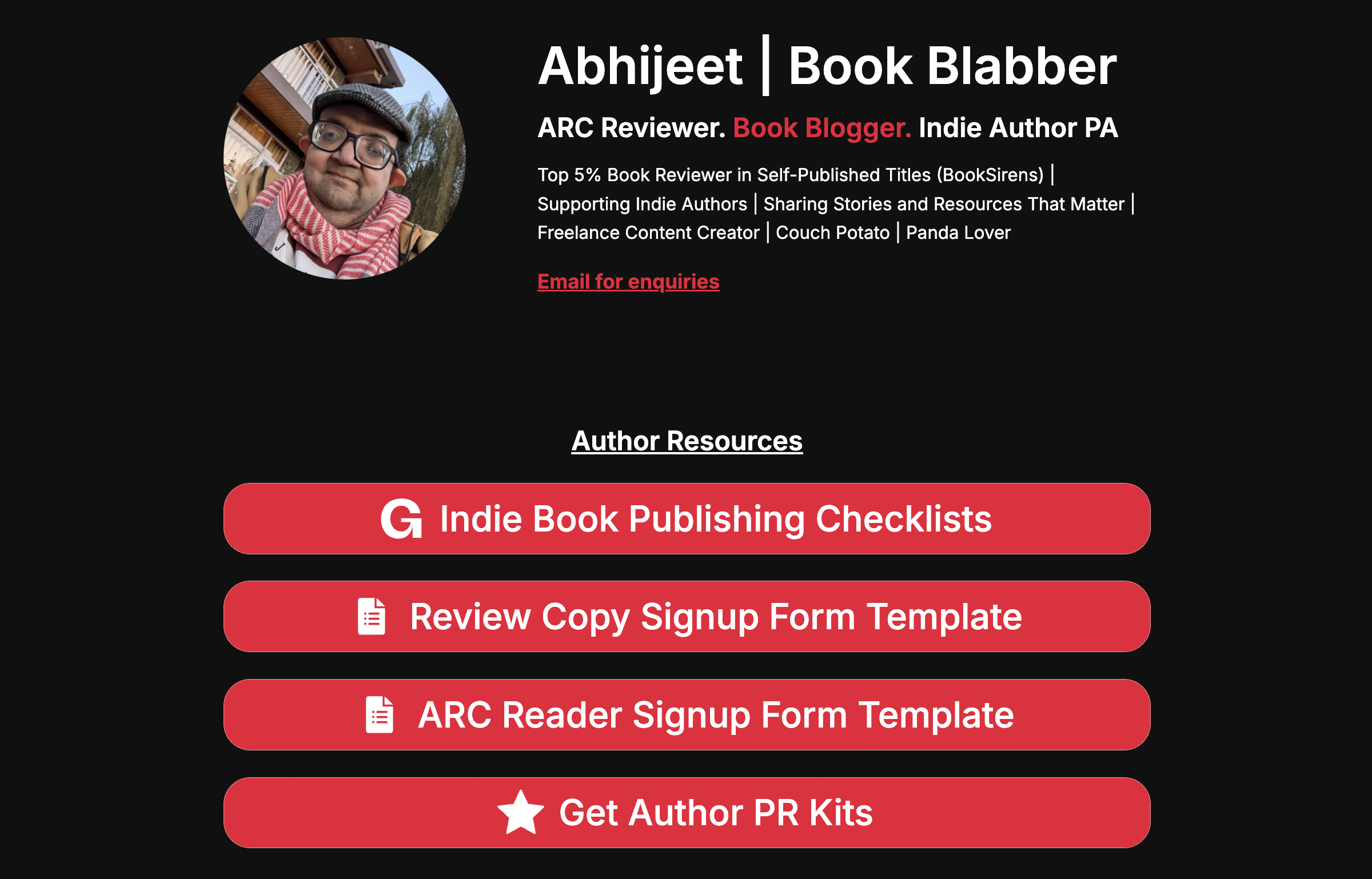
If you want a simple, polished landing page for authors, get started with Carrd now. It’s entirely customisable and doesn't cost a fortune.
The pages look clean and professional, and they load fast. Plus – this is huge – Carrd sites can be indexed by Google, which helps with SEO. Linktree? Nope.
Carrd’s free plan is honestly generous (hosting up to three sites), and the Pro plan is just $19/year. It’s wayyy cheaper than Linktree's premium tier (or any other such tool), giving you way more bang for your buck.
Is Carrd Pro worth it? Check my Carrd review
Carrd vs Linktree for Author Links Page
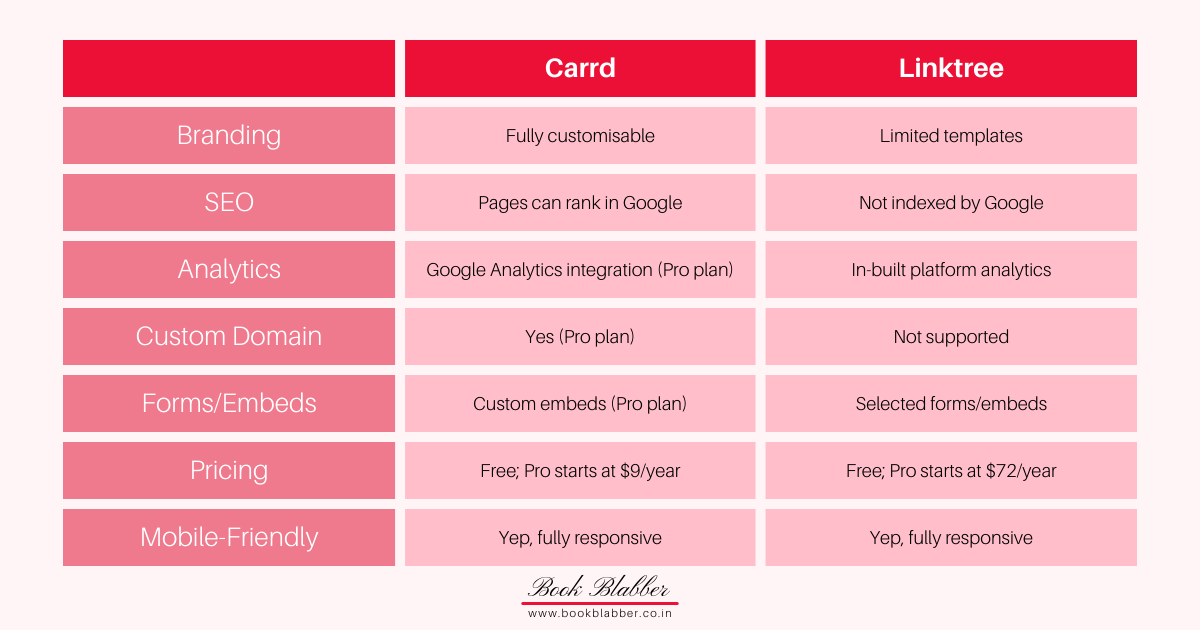
Carrd is a strong choice if you want full control over your author links page. It lets you design a completely custom page with drag-and-drop flexibility, your own branding, and even a custom domain on the Pro plan. Carrd pages can be indexed by Google, which means they can rank in search results. The free plan offers up to three sites (more with premium plans, starting at just $9 per year). If you take Pro, you also get Google Analytics integration, custom embeds, and forms.
Linktree is all about speed and simplicity. It’s extremely easy to set up, making it ideal if you just want a quick, no-frills way to share multiple links. But the design is template-based with limited customisation. It also doesn’t support custom domains, but it does include built-in analytics. It has a free plan, with paid plans starting at $72 per year.
Build Your Link in Bio Page with Carrd
Building your author links page with Carrd is straightforward. No tech wizardry required. Although it does have a learning curve, you can cook up a professional-looking page in 30 minutes or so. I'm going to walk you through the steps.
Ready? Let's go:
1. Choose a template
Head over to carrd.co and browse the template gallery. Pick a clean, one-page design closest to your idea of author link-in-bio page. Templates from "Profile" or "Landing" can be perfect starting points for you. You can always tweak things later, so don't overthink it.
2. Add your name, tagline, and sections
Click into the editor and swap out the placeholder text with your author name and a short tagline. For example, mine's “ARC Reviewer. Book Blogger. Indie Author PA” after the heading – Abhijeet | Book Blabber. Just keep it simple and you.
Then, create and organise sections for your books, author profiles, ARC signup forms, and anything else you want to share. Carrd's drag-and-drop editor makes rearranging sections stupid easy.
Also read: How to Become a Goodreads Author
3. Insert links
Once you’re done organising, add your links. Want to showcase your newest cover as a clickable image? Go for it. Want to embed your latest book trailer? Carrd supports video embeds. You can customise button colours to match your book covers, add hover effects, and include icons within buttons for instant visual appeal.
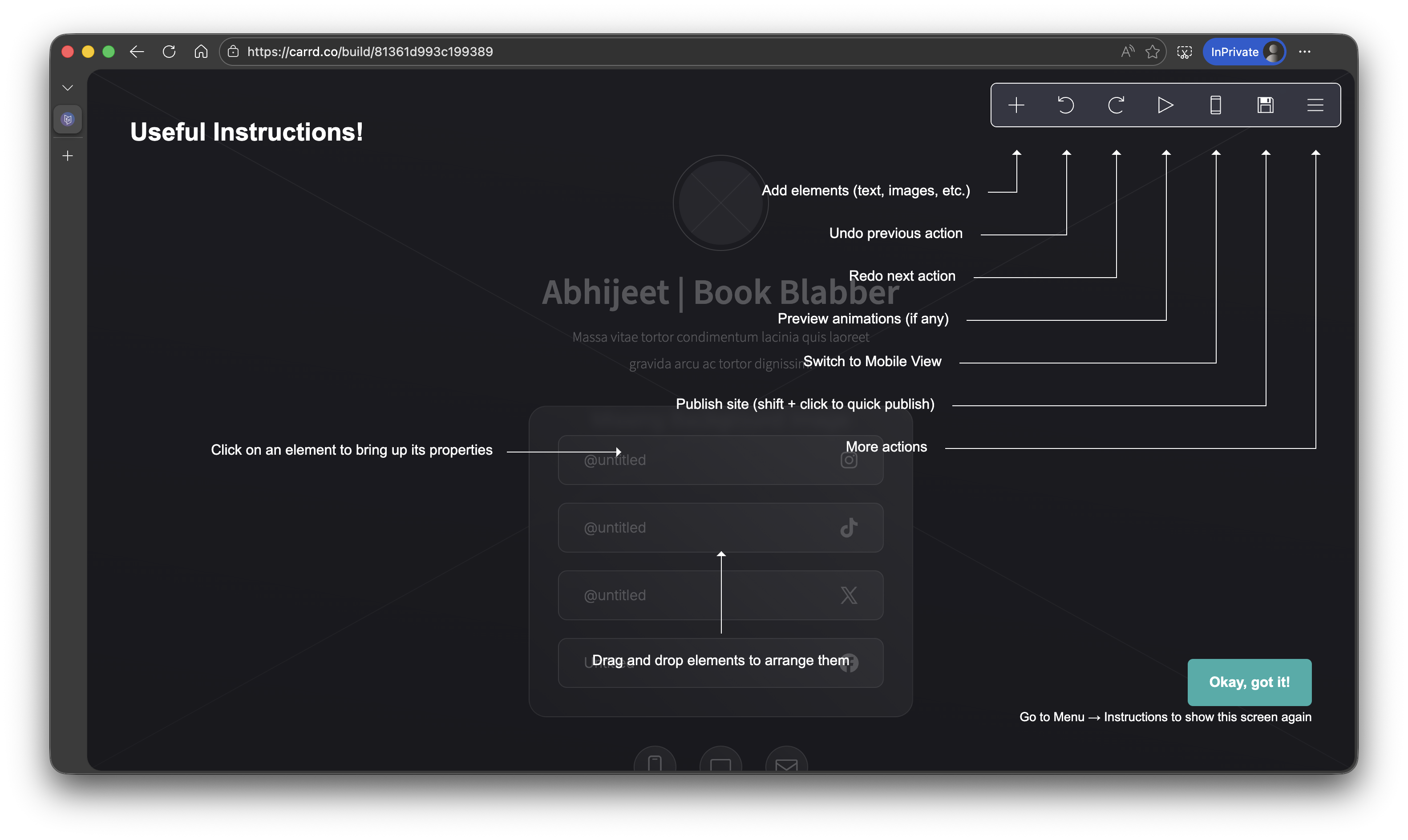
4. Sign up to save your page
Now, create a free Carrd account so you can save, edit and publish your page as required. The free plan allows you to create up to three sites (with core customisations), plenty for most authors just starting out. Pro users get more one-page sites to build, along with additional features such as forms, link embeds and advanced CSS customisations.
5. Publish and share
At the end, all you need to do is save your page and publish. Initially, Carrd generates a carrd.co link for you. To connect it to a custom domain you have, you need to be on one of the Pro plans (starting at just $9/year).
Carrd Pro version offers the easiest way to get a customised author links page without wrestling with complicated website builders. Once it's live, drop your Carrd link into your Instagram bio, Twitter profile, email signature, and anywhere else readers might be looking for you.
Other Easy Tools to Create Link in Bio for Authors
Carrd's my go-to, but there are other good link-in-bio tools for authors. Here are some of the best Linktree alternatives and free tools to create author links page that might fit your workflow better:
1. Notion page
If you're already using Notion to organise your drafts, plot notes, or marketing calendar, you can spin up a quick author links hub in 5-10 minutes. Just create a simple page listing your book buy links, Goodreads/Amazon profiles, and newsletter signup. It's super easy to update whenever you drop a new book or get featured somewhere cool. The layout is clean as well.
Notion isn't as design-rich as Carrd, but it’s perfect if you want a functional, no-frills solution that lives inside your existing workflow. Plus, Notion's collaborative features are handy if you've got a VA or a launch team helping you out.
2. Canva
Even though Canva is primarily a graphic design tool, it lets you publish a design online as a one-page site. And if you're already designing graphics in Canva (book mockups, Instagram posts or whatever), this is a natural fit. The drag-and-drop editor is dead simple, and you can make your page look exactly like your brand – matching your book covers, favourite colours, all of it.
In Canva, you can publish instantly with a shareable link. The downside? It's not great for SEO or analytics. So, if discoverability matters to you, Canva websites might feel limiting. They’re a strong pick if you want something beautiful set up without going out of your comfort zone.
3. Own website (/links page)
If you already have an author website on WordPress, Wix or Squarespace, you can just add a dedicated “/links” page. Yeah, I’m serious. This keeps all your traffic on your own domain, which is great for SEO and makes you look super professional. You can style the page to match your existing site, toss in your book buy links, social profiles, newsletter signup – whatever you need.
The best part? You own the space entirely. No third-party platform can change the rules on you or shut down overnight. It's a bit more setup work than grabbing a Carrd template, but it's definitely a future-proof option for building a long-term author platform.
4. GitHub Pages
Okay, this one's for the tech-curious authors out there. GitHub Pages lets you host a lightweight static site for free. Think of it as a super-minimal landing page you build with HTML. You can create a simple page listing your links, book buy buttons, newsletter signup, etc. It's fast, reliable and completely under your control.
If you like tinkering, want a free, customisable solution, and maybe learn some web dev skills along the way, GitHub Pages is a solid, nerdy-fun choice. You must be comfortable with a bit of coding and GitHub's workflow, though, so it's definitely not beginner-friendly.
5. Other Link-in-Bio Tools
Beyond Carrd, there are a bunch of indie author marketing tools worth checking out. Beacons is one supercharged creator hub, which is cool if you want readers to support you directly. Taplink is another, with multimedia blocks and messaging options to create a mobile-friendly website.
Bizlite.co is a newer link-in-bio tool focused on professional branding. It gives you a polished hub with analytics and customisation options. It’s just like Linktree – quick to set up and social-friendly. With additional support for physical NFC/QR cards to carry your links physically. Handy if you want simplicity and offline reach without managing a full website.
FAQs: Author Links Pages Without Linktree
Q. Why did people stop using Linktree?
A. Honestly? Most creators realised they needed to own their content and control their branding. Indie authors, especially, need tools that reflect their unique voice and books, not a generic page that could belong to literally anyone. Link-in-bio pages made on Carrd (or your own site) give you way more long-term control and credibility.
Q. Do I need Linktree if I have a website?
A. Nope. If you have an author website, you can just create a page of links on your own website or a subdomain. This keeps readers on your domain, boosts SEO, and reinforces your brand.
Q. Do self-published authors need a website?
A. Not actually. Having one, though, makes you more accessible. After all, readers, book bloggers, and media outlets should have a central place to learn about you and your books. Even a simple landing page for authors on Carrd can absolutely serve as your website.
Q. What are the top Linktree alternatives for authors?
A. The best Linktree alternative for authors, in my opinion, is Carrd. It’s affordable, customisable and SEO-friendly. Other options include Notion, Canva and GitHub Pages.
Q. Is Linktree or Carrd better?
A. For indie authors? Carrd, hands down. It offers way more options for customisation, and a polished, professional look at a fraction of Linktree's cost. Carrd's Pro plans start at only $9/year, which gives you the option to add custom domains.
Get Started with Carrd for Authors
Creating an author links page doesn't have to be complicated and expensive. With Carrd, you get an SEO-friendly alternative to Linktree that puts you in control of your author brand. Whether you're launching your first book or levelling up your presence, Carrd makes it easy to create links page.
Carrd’s link-in-bio for authors is definitely more professional-looking than Linktree. And it’s time you make it ridiculously easy for readers to find your books and social platforms in one place.
Make your links page with Carrd
Join Book Blabbers WhatsApp group to bond over books, memes and quotes.
Subscribe to Book Blabber's Bulletin to get book summaries, reading tips and occasional hugs in your inbox.



Comments