
How to Become a Goodreads Author
Goodreads is one of the largest online communities for book lovers, with millions of readers discovering, reviewing and recommending titles every day. And joining the Goodreads Author Program is a powerful way for authors to build credibility, showcase your work, and engage directly with your readers.
The process of becoming a Goodreads Author is straightforward. However, it’s important that your information is filled in carefully, so that your author profile is easily verified and your published (or about to be published) books are correctly attributed.
Let’s demystify how to become a Goodreads Author.
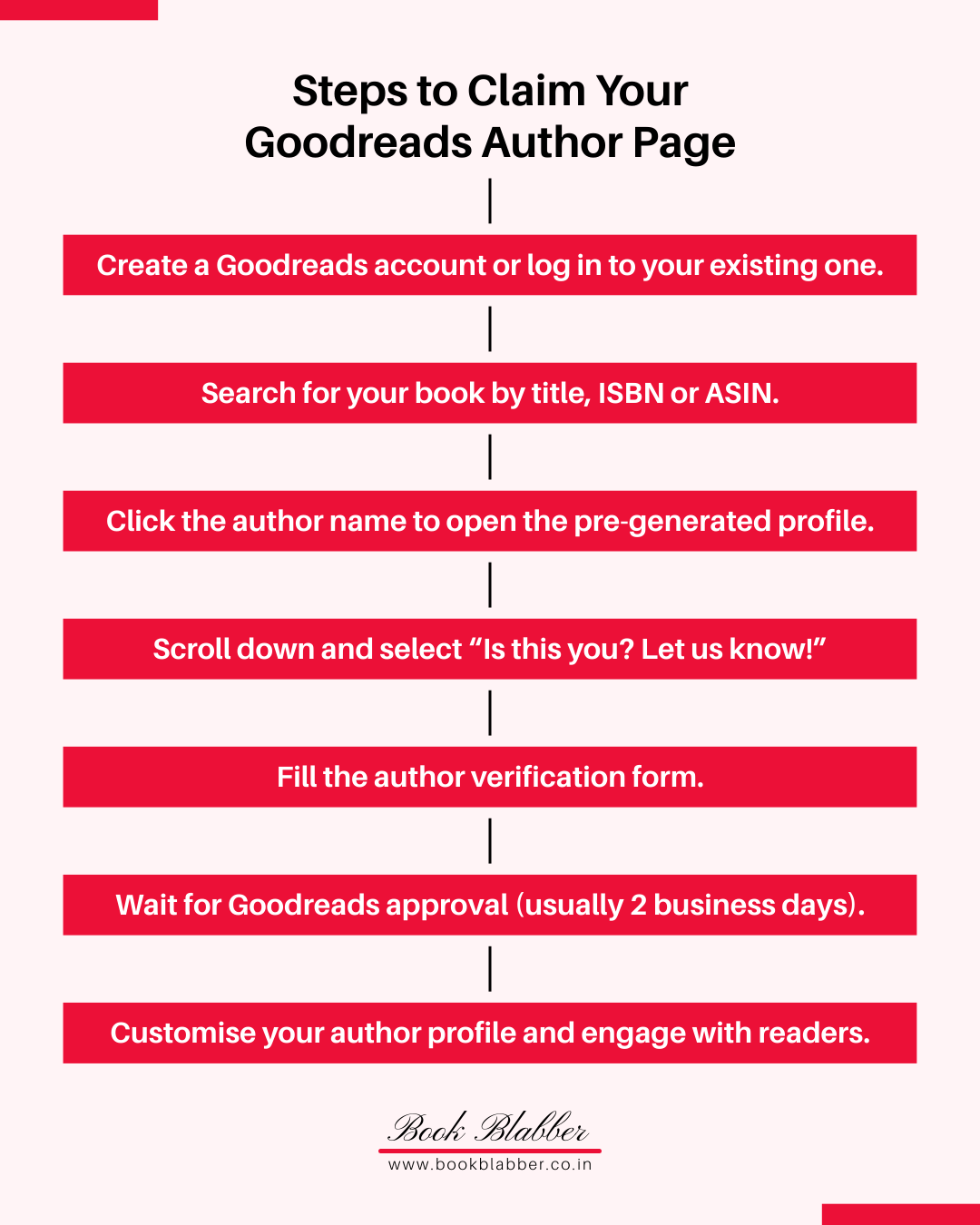
Step 1: Sign in to Goodreads
Begin by creating a Goodreads account or logging in to your existing one. This account will serve as the foundation for your author profile. Goodreads uses your account credentials to verify your identity. Use the same email across your Goodreads account, author website and Amazon KDP (if using that for publishing) to streamline verification.
If you publish under multiple pen names, you’ll need to create separate Goodreads accounts for each name. Goodreads requires distinct accounts so that each author profile remains accurate and consistent with its associated books.
Step 2: Find your book
Use the Goodreads search bar to locate your book by title, ISBN or ASIN. It’s easy to get into the Goodreads Author Program if your books are already in its database. If your book isn’t listed, you’ll need to request that librarians add it.
Double‑check metadata (title, author name, ISBN, etc.) to ensure your book is correctly attributed to your author profile. Just to be safe, choose an already published book to start your author page.
Step 3: Go to the Author page
Click the author name on your book’s page to open the automatically generated author profile. This page is the foundation of your Goodreads Author presence. This is the page readers would reach when they want to explore other books written by you. An unclaimed profile looks incomplete and may reduce credibility. You’ll get to fill in and personalise the details after claiming the page.
Step 4: Claim your Goodreads Author profile
Now, scroll down the author page and click “Is this you? Let us know!” to begin the claim process. This is the step that transforms you from a listed author into a verified Goodreads Author with a badge. This is almost like verification on social media, and you’ll also have access to editing rights after approval.
Need help setting up a Goodreads Author profile? Contact Book Blabber to get it done for you
Step 5: Fill the verification form
Goodreads will prompt you to complete a verification form. Before filling it, ensure your Goodreads account email matches your author email address, and make sure your author email is visible on your official website. If you publish through Amazon KDP, use the email tied to your KDP account.
Don’t have an author website yet? Build one quickly with Carrd.co website builder. Carrd is an easy-to-use, affordable platform for building clean one‑page websites in minutes.
Step 6: Wait for Goodreads to approve
After you submit the form, Goodreads staff will review your application. Approval usually takes up to two business days. Use this time to prepare your author assets – a polished bio, a professional photo, and links to your website (and social media) – so you can update your Goodreads author page immediately once approval comes through.
Also read: An Easy Way to Make Author Links Page Without Linktree
Step 7: Customise and engage
Once approved, you’ll receive an email with the link to your author dashboard. Your Goodreads profile will also display the verified Goodreads Author badge.
Now, you can update your bio, photo and book listings to your satisfaction. Having an author page also enables you to use a few promotional tools such as:
- run giveaways to generate buzz around your books
- use Ask the Author to answer reader questions directly.
- connect your blog to share updates automatically.
Make sure that you keep your profile fresh. A customised, active profile builds trust and makes readers more likely to follow your work.
Also read: How to Get Readers for ARC for Book Launches
Should an author have a Goodreads account
The short answer is yes. Goodreads isn’t just another social platform. It’s a dedicated space where millions of readers actively seek out books and look at reviews. Whether you’re debuting your first book or managing a growing catalog, Goodreads Author Program is one of the simplest ways to meet readers where they already are.
A verified author badge builds credibility, while tools like giveaways and blog integration help you foster meaningful connections with readers. Claiming a Goodreads Author page establishes your online presence as an author.
How to claim books on Goodreads Author page
After claiming your author profile, you may notice that the page shows wrong books, or it is missing some of your titles. If your book isn’t showing up, first confirm it exists in the Goodreads database. If not, you can add a book from your author dashboard.
Except for adding missing books, you need to contact Goodreads Librarians Group. They can help remove incorrect attributions, merge duplicate editions, change book covers, or make other edits.
For details, see the official help page: How to get the right books on your profile
Become a Goodreads Author today
If you’re an author looking to connect more closely with your readers, joining the Goodreads Author Program is an essential step. It helps you build a loyal community where millions of book lovers are already searching for their next read. It opens the door to meaningful conversations with fans.
Whether you’re a debut writer or an established author, becoming a Goodreads Author strengthens your presence in the reading community. So, sign in to Goodreads and claim your author profile.
Comments